
中文 | English




# Session Navigator
Manage DSH sessions the way Windows Explorer manages files, so that session management is as simple as file management.
An index lives under `~/.dsh-session-navigator/`: folders, names, tags, notes.
**Who it is for**: people with many sessions — sort, move, delete, annotate and rename your sessions and workspaces as you please, put sessions on a to-do list, in favorites or at the top, and session management is as simple as file management.
- The folder tree is built from your workspaces; make folders of your own, nest them as deep as you like, and drag workspaces and sessions in and out
- All sessions is cut into one band per workspace, captioned with the workspace's name; click a caption to fold the whole band, and the folded set is saved together with the layout
- Sidecar projections are reused by file size + mtime, so unchanged sessions are never re-read: 141 ms → 2 ms for the listing, 129 ms → 4 ms when the panel reopens
- Titles, tags and notes are your own words, written whenever you like
- Search covers titles, notes and tags, and a "conversation content" tick also searches the dialogue itself (what the user said and what the agent replied, not tool output); the funnel on the right of the box opens the search-scope dialog, where the place is all locations (the default) or the current folder, with one link straight to the search index settings
- Favorites, todos, pins and archive; a recycle bin comes with them, so a delete can be taken back
- Cut and paste across workspaces; export a session as Markdown or JSONL: what the user said, what the agent answered, every tool call and its output, with compacted history kept verbatim
- AI in one click: let a model rename a session, tag it and write its note
## What it looks like
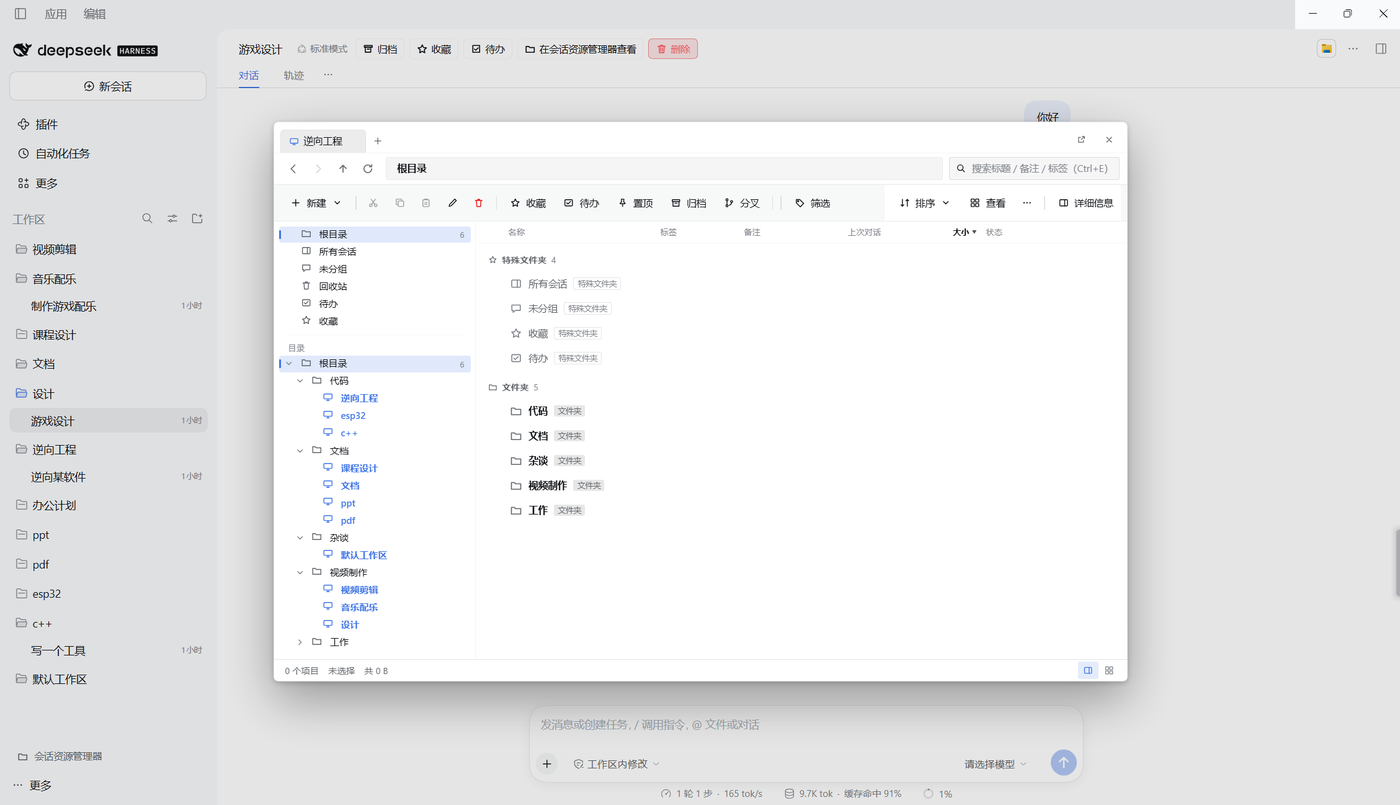
Floating panel
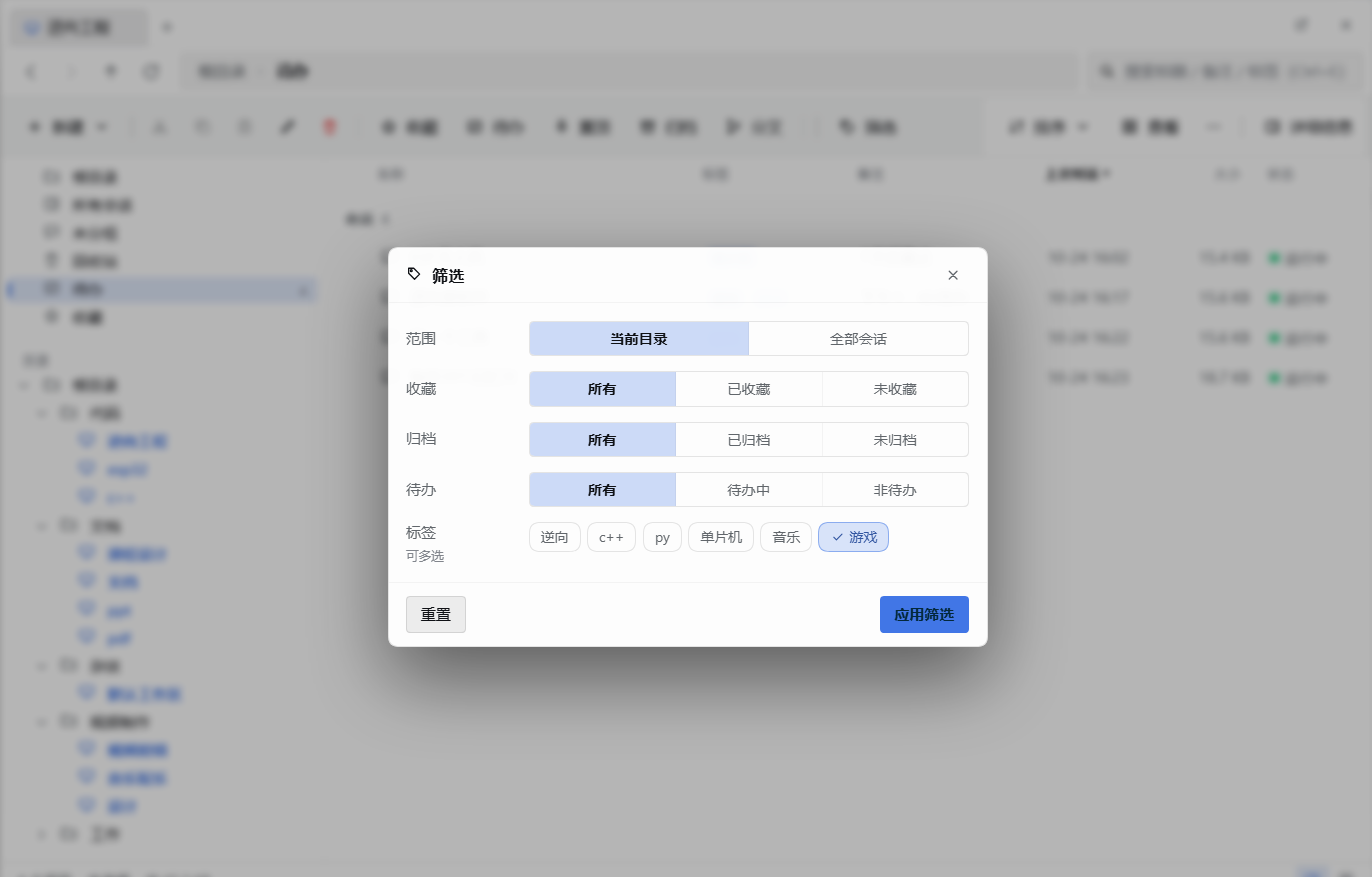
Filter
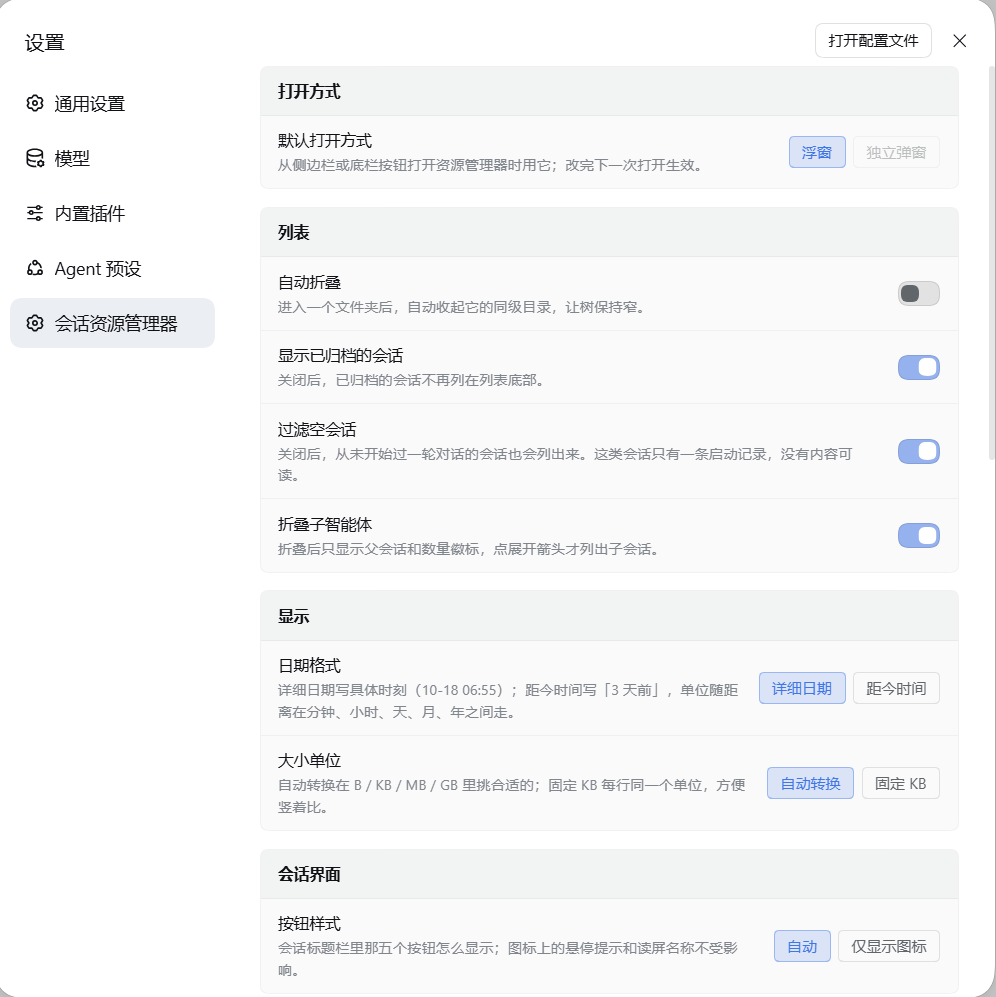
Settings
Is the floating panel too small to be comfortable? Detach it into a window of its own — a real Explorer.
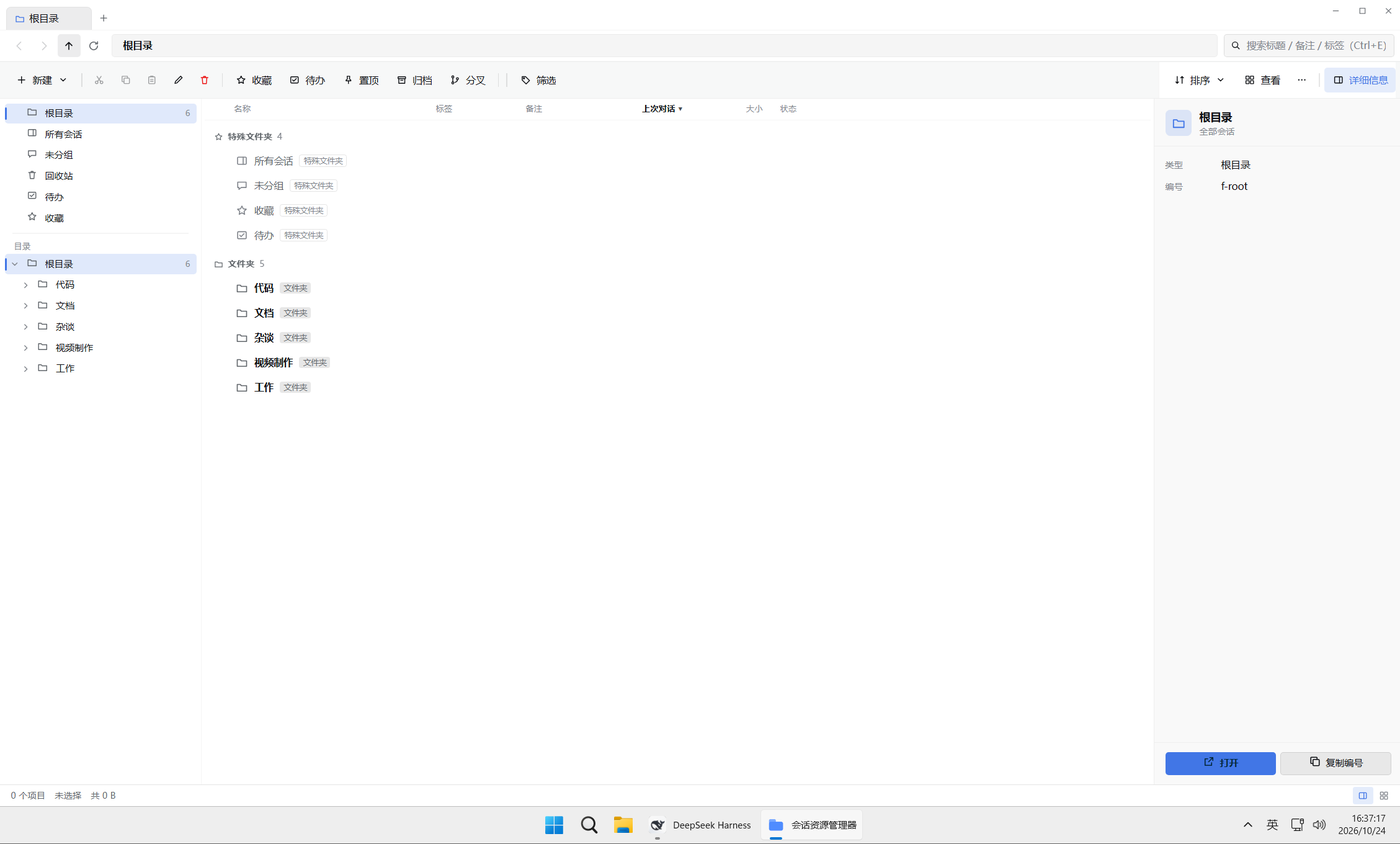
Detached window, full screen
And of course it can share the screen: split across one monitor, or one per monitor.
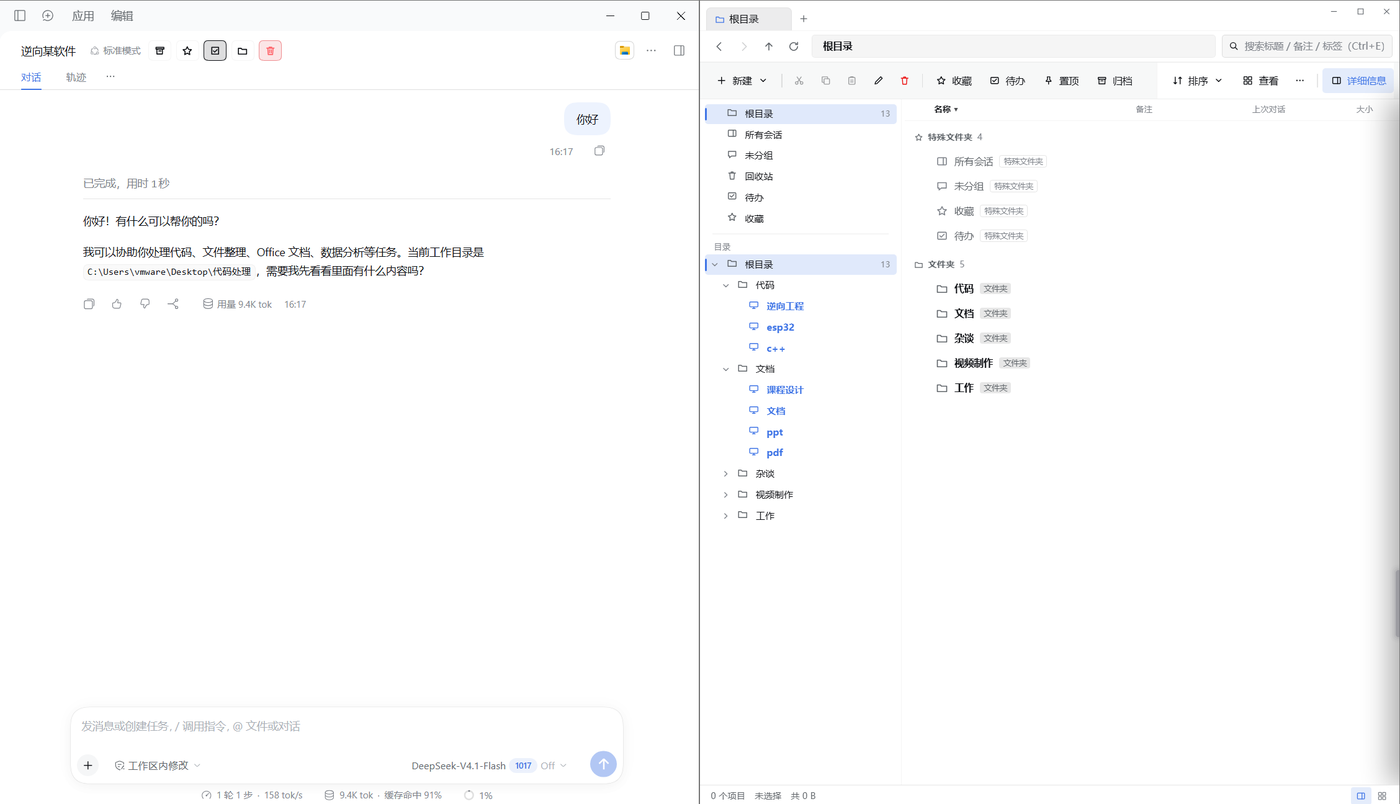
Split view
## Install
### Quick start (recommended)
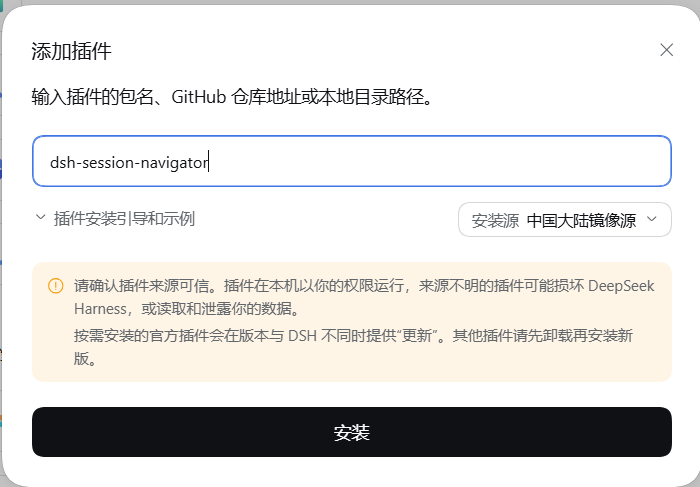
DSH plugin page → "添加插件" (add plugin) → type `dsh-session-navigator` → install → restart DSH.
### From the command line
Web:
```powershell
dsh plugin --profile web add dsh-session-navigator
```
Desktop:
```powershell
dsh plugin --profile desktop add dsh-session-navigator
```
### From the GitHub source
Web
```powershell
dsh plugin --profile web add github:Anlerway/dsh-session-navigator
```
Desktop
```powershell
dsh plugin --profile desktop add github:Anlerway/dsh-session-navigator
```
### From a local file
Download the package: [latest release](https://github.com/Anlerway/dsh-session-navigator/releases/latest)
```powershell
dsh plugin --profile web add ''
```
### Update
Web
```powershell
dsh plugin --profile web add dsh-session-navigator@latest
```
Desktop
```powershell
dsh plugin --profile desktop add dsh-session-navigator@latest
```
### Uninstall
Web
```powershell
dsh plugin --profile web remove dsh-session-navigator
```
Desktop
```powershell
dsh plugin --profile desktop remove dsh-session-navigator
```
The plugin's own data is not removed with it; delete `~/.dsh-session-navigator/` to clean up completely.
Requires Node.js `^22.15.0 || >=24.0.0`.
## What you can do
| Task | How |
| --- | --- |
| Group sessions | Create a folder inside a workspace and drag sessions into it |
| Box select | Drag a box with the mouse the way Windows does; a click on empty space clears the selection |
| Rename | The edit button, or the detail pane on the right |
| Tag / note | Right-hand detail pane; tags can be made in advance, and AI can generate them in one click |
| Search | The box searches titles, notes, tags and conversation content; the funnel on its right opens the search-scope dialog |
| Favorite / to-do | Select rows, then favorite them or put them on the to-do list |
| Shortcut | Right-click → "Create a shortcut in this directory"; a shortcut can live in any folder |
| Pin | Folders and workspaces pin to the front, in sync with the sessions DSH itself pins |
| Quick access | Add entries on the left to reach the folders you use most in one click |
| Archive | Listed at the bottom by default; hide them in settings |
| Delete | The whole session directory moves to the recycle bin; restorable, purgeable |
| Change workspace | Cut / paste across workspaces; the session moves as it is |
| Export | Detail pane and row menu; Markdown or JSONL — what the user said, what the agent answered, every tool call and output, with compacted history kept verbatim |
| AI fields | A model writes a **title, description and tags** for a session: one click in the "AI fields" group of the detail pane, several sessions at once from the row menu, or one sweep over every session still missing a description or tags in settings |
## Settings
| Setting | Default | Notes |
| --- | --- | --- |
| Open mode | Floating panel | Floating panel / detached window; the detached window needs an extra browser runtime download and is Windows-only |
| Session header button style | Auto | It can also be fixed to icon only |
| Auto collapse | Off | Collapse sibling folders after entering one |
| Show archived | On | Turned off, archived sessions are no longer listed at the bottom |
| Hide empty sessions | On | Sessions that never had a turn are not listed |
| Collapse subagents | On | Click the arrow to expand |
| Date format | Exact date | Or time since then |
| Size unit | Auto | Switch between B / KB / MB / GB, or fix it to KB |
| Build the index when idle | Off | Once on, it fills the index in slowly in the background after startup and holds up no request |
| Rebuild / delete index | — | Rebuild from scratch, or delete the cache file |
| Fields model | Host default | Pick a model and a reasoning effort from the DSH model catalogue |
| Fill in what is missing | — | Queues every session missing a **description or tags**; progress shows on the settings page and at the bottom of the panel, and it can be stopped at any time |
| Data directory | `~/.dsh-session-navigator` | For migration; change it in settings |
## Docs
- [Architecture](docs/architecture.md) · [HTTP API](docs/api.md) · [Data directory](docs/data-directory.md)
- [The rules of the tree](docs/tree-and-placement.md) · [Detached window component](docs/component.md) · [Theme and bridge](docs/bridge-and-theme.md)
- [Testing](docs/testing.md) · [Documentation index](docs/README.md)
## Development and testing
```powershell
node --test "test/*.test.mjs" # 573 cases
node test/render-smoke.mjs # render smoke test
```
## Issues
If you need macOS or Linux support, run into a bug, or want a feature that is missing, please open an issue.
## License
MIT, see [LICENSE](LICENSE).